
Use Cases
The Ioto device agent can be utilized in a variety of use cases:
HTTP Client
Ioto includes a streaming HTTP Client so you can make REST and HTTP requests to external web services.
The API provides a simple GET and POST routines and a powerful fully streaming fetch call.
As Ioto uses fiber coroutines, you can process streamed data (in either direction) without ugly callbacks or complex threads. Other fibers in Ioto continue to run transparently while the HTTP client is waiting for I/O.
Ioto uses the HTTP client to communicate with external services and REST APIs.
Example
//  Simple get
data = urlGet("https://www.example.com");

//  Simple post
data = urlPost("https://www.example.com", "POST", body, bodyLen,
    "Authorization: bearer %s\r\n", authToken);

//  Or fully streaming fetch
char  buf[1024];
ssize nbytes;
int   status;

status = urlFetch(up, "https://www.example.com", "POST", body, bodyLen, headers);
do {
    if ((nbytes = urlRead(up, buf, sizeof(buf))) > 0) {
        printf("%s", buf);
    }
} while (nbytes > 0);
Local Device Management
Embedded web servers are useful for a variety of use cases including:
- Local end-user device setup and ongoing management.
- Provide a programatic REST API for device operation, data and metrics.
- Provide a debug web interface for developers creating connected devices.
Embedded Web Server
The Ioto agent can be used as a stand-alone embedded web server.
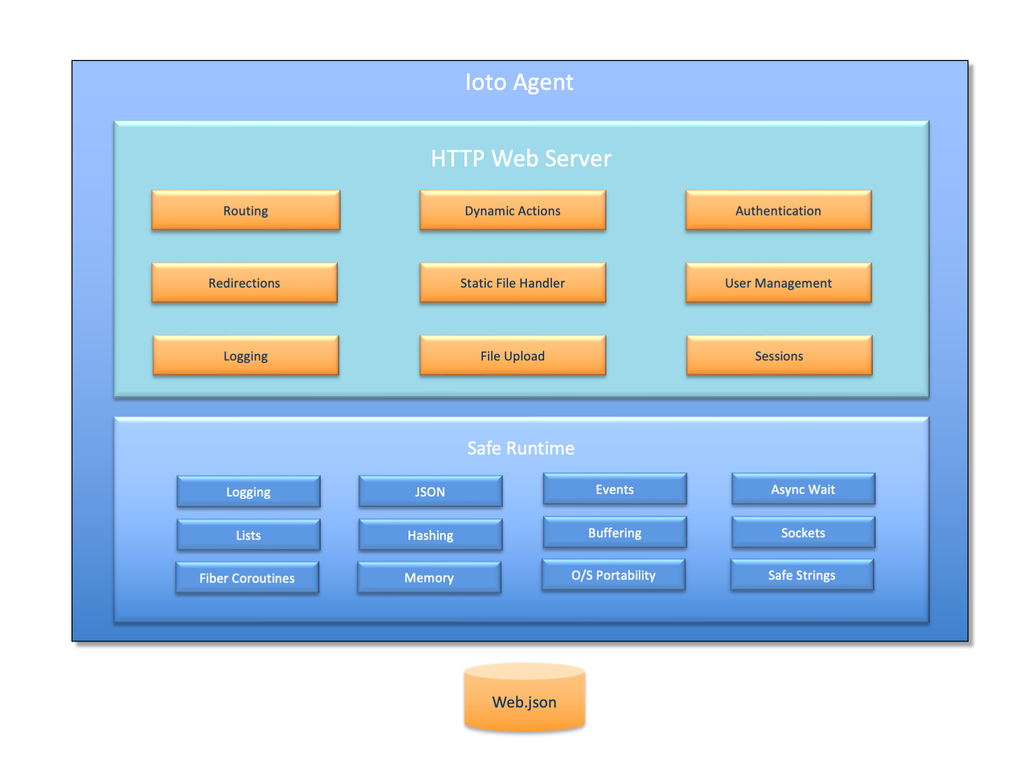
Ioto can be configured and compiled to run only the web server and thus be a first-class replacement for any embedded web server. EmbedThis has been developing embedded web servers for many years and the Ioto web server contains all that we have learned over this period.
Ioto is our best embedded web server with performance and security that surpasses other web servers.
The Ioto web server is unlike other embedded web servers in that it does not try to offer ALL HTTP features and functions. Rather, it implements only the essential core of HTTP/1.1 and thus deliver a tiny, fast, secure embedded web server that is exceptionally good at serving single-page device management web applications and device data APIs with a very small security footprint.
The Ioto web server supports: HTTP/1, HTTP/1.1, TLS/SSL, Action routines, user authentication, sessions, cookie management, request logging, and security sandboxing. Best of all, Ioto is tiny using only 80K of code. It will serve over 3,300 requests/sec on a Raspberry PI class of device.
The Ioto web server is fully streaming for receive and transmit data. It can receive live streaming data and dynamically generate responses based on device data.
Example
//  Bind a URL to a function to generate the response

webAddAction(host, "/test", testAction);

//  Invoked for /test requests
static int testAction(Web *web)
{
    char  buf[ME_BUFSIZE];
    ssize nbytes;
    int   i;

    //  Streaming read of POST body data
    while ((nbytes = webRead(web, buf, sizeof(buf))) > 0) {
        printf("Got body data %.*s\n", (int) nbytes, buf);
    }

    //  Streaming a response without buffering and with minimal memory footprint
    for (i = 0; i < 10000000; i++) {
        //  This will block as required, but other fibers can still run.
        webWriteFmt(web, "Hello World, now is: %s\n", rFormatLocalTime(0, 0));
    }
    //  Finalize
    webWrite(web, NULL, 0);
    return 0;
}
For more details, please read the Ioto Web Server.
MQTT Client
MQTT is a light-weight client/server publish/subscribe messaging transport protocol. It is simple and has very low overhead and this makes it ideal for use in embedded devices and IoT where a small code footprint and minimal network overhead is required.
Ioto has a high-performance, flexible MQTT client that can be used to communicate with any MQTT broker supporting MQTT 3.1.1.
The Ioto MQTT agent is non-blocking, but also supports a blocking mode where you can wait for a message to be acknowledged or receipt of a response. This enables the MQTT protocol to be used for request/response APIs. Because, Ioto uses fiber coroutines, even when an MQTT sequence of operations are blocking, other APIs and services continue to run in other fibers.
PUBLIC int ioStart(void)
{
/*
    Subscribe for incoming notifications.
    This call will block and wait for acknowledgement.
    Note: call blocks, but agent is not.
 */
mqttSubscribe(ioto->mqtt, incoming, MQTT_QOS_2, MQTT_WAIT_ACK, "/myDevice/change");

/*
    Publish an "initialized" message with quality of service (1) which means send at most once.
    Don't wait for sending or acknowledgement.
 */
mqttPublish(ioto->mqtt, "Initialized", 0, MQTT_QOS_1, MQTT_WAIT_NONE, "/myDevice/init");